
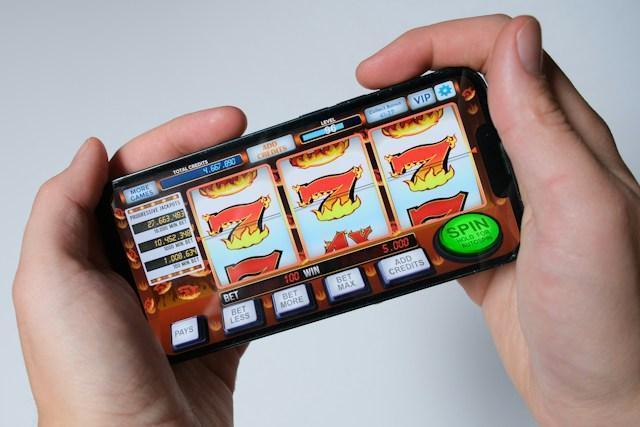
Online slots have changed considerably since their early days on desktop computers. What once required a fixed screen and dedicated time can now happen through a mobile phone or tablet. This shift has influenced more than accessibility. Touchscreen controls, shorter sessions, notifications, and vertical displays have changed how players interact with familiar slot games.
Mobile devices also introduce different viewing habits and navigation methods. Understanding these changes reveals how the everyday experience of online slots has evolved alongside increasingly portable digital entertainment.
From Desktop to Pocket Play
Online slots were once closely associated with desktop computers. Players needed to sit at a desk, open a browser, and navigate games using a mouse and keyboard. Access was largely tied to a particular location.
Mobile devices have changed that arrangement. Players can now open slot games through smartphones or tablets wherever supported internet access is available. The experience no longer depends on having a computer nearby.
Those who play online slots can move between devices without necessarily changing their preferred games. A title previously accessed through a desktop browser may also be available through a mobile website or dedicated application.
This portability changes how players access their games. Mobile devices make supported titles available in a wider range of settings, depending on location and connectivity. Desktop gaming remains an option, while mobile access makes the experience less dependent on fixed equipment.
Touch Controls and Interface Design
Playing slots on a touchscreen feels different from using a desktop computer. Mouse clicks give way to taps, while swiping allows players to move through menus and browse available titles. Smaller screens also influence how controls and game information are arranged.
Several interface features shape the mobile experience:
- Touchscreen navigation: Taps replace mouse clicks, while supported swipe gestures make browsing menus and games more convenient.
- Accessible controls: Spin buttons, stake selectors, and navigation icons are generally positioned for convenient access.
- One-handed operation: Some layouts allow players to use their thumb for common actions, depending on screen size and control placement.
- Expandable menus: Additional settings may appear in collapsible panels, keeping the main reels visible.
These adjustments become particularly noticeable when holding a phone vertically. Essential controls typically occupy accessible areas of the screen, while menus and additional information fit into more compact spaces.
Desktop versions provide more room for detailed menus and larger control panels. Mobile interfaces prioritize immediate access to essential functions, although certain settings may require additional taps. The main difference lies in how players interact with the game rather than its underlying rules.
Shorter Sessions and Interrupted Play
Desktop slot sessions traditionally involved remaining at a computer for a continuous period. Mobile access offers greater flexibility, allowing games to be opened for brief intervals or longer sessions, depending on individual preferences.
A player might launch a slot during a break, close it when another activity requires attention, and return later. The device remains nearby, making access possible without returning to a dedicated gaming setup.
However, interrupted sessions don’t always resume at precisely the same point. Some platforms preserve account settings or previous game selections, while others require players to reload the title. Connection interruptions can also affect how a session continues.
These differences change the practical rhythm of mobile play. Players can access digital entertainment without remaining seated at one location. Both desktop and mobile devices support different session lengths, but mobile access provides greater flexibility in how games are opened and revisited.
Notifications and Returning to Play
Mobile devices introduce another feature that traditional desktop sessions rarely emphasized: notifications. Supported applications can display alerts on a phone’s home screen, even when the game itself is not open.
Depending on the platform and notification preferences, these messages may include:
- Software updates: Information about application improvements or changes.
- New game releases: Announcements about titles added to the available selection.
- Account activity: Updates related to account settings or services.
- Platform features: Information about changes to available functions.
Players can generally manage notifications through device settings, while some applications offer additional controls for specific message categories. Optional promotional notifications may also depend on user consent and applicable communication rules.
Notifications provide another way to receive platform information without opening a desktop browser. Their availability and frequency depend on application permissions, individual preferences, and the platform’s supported features.
Portrait Screens and Visual Adjustments
Desktop slot games usually appear within wide browser windows. Reels, symbols, menus, and additional information can occupy separate areas with more room for navigation. Mobile screens require a different approach to arranging these elements.
Portrait orientation provides a taller, narrower viewing area. Players may see the reels positioned centrally, with essential controls arranged above or below them. Decorative elements sometimes occupy less space than in desktop versions.
Paytables and settings frequently appear behind expandable icons. Players can open these panels when needed, then return to the main game screen. Some titles also support landscape orientation for a wider view.
The visual experience changes accordingly. Symbols may appear smaller, animations can be adjusted to fit the display, and information may require additional navigation. The same game version generally retains its core rules across supported devices, although available features and settings can vary. Mobile presentation concentrates attention on the reels and immediate controls, while desktop layouts provide more room for surrounding details.
How Mobile Play Fits Players
Mobile slots have changed how players access familiar casino games. A smartphone allows titles to move beyond the desktop, making them available through a portable device whenever the platform and connection permit.
Touch controls also reshape interaction. Tapping replaces clicking, while compact menus and accessible buttons accommodate smaller screens. Portrait layouts further influence how players view reels, symbols, and game information.
Sessions can become more flexible as well. Players may open a title briefly, leave when interrupted, and return later. Notifications provide another way to receive information about available games and platform updates.
These features distinguish mobile slots from their desktop counterparts. Neither format changes the basic purpose of a slot game, but each presents it differently. Players can compare both experiences according to their preferred device, screen layout, and access requirements.
A Familiar Game in a Different Format
Mobile gaming has changed how players access and experience online slots while preserving familiar reels, symbols, and game rules. Touchscreens, portable devices, and compact layouts offer greater flexibility in navigation and presentation. Although availability depends on the platform and location, these features allow players to enjoy familiar games across supported devices, with different options for screen layout and interaction.